Event Planner Printable Page: A Practical Tool for Real-World Planning and Execution
An Event Planner Printable Page isn’t just another notebook—it’s a structured, adaptable workflow companion designed for people who plan, coordinate, launch, and reflect. Whether you’re organizing a community workshop, managing client events as a freelancer, prepping a product launch, or building a KDP planner business, this tool bridges intention and action. Its value lies not in novelty, but in consistency, compatibility, and real-world readiness.
What It Is—and Where It Fits in Your Process
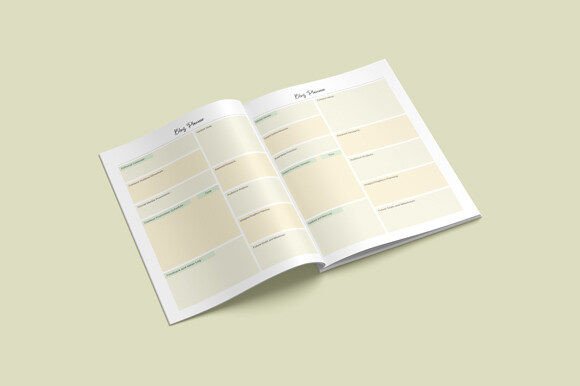
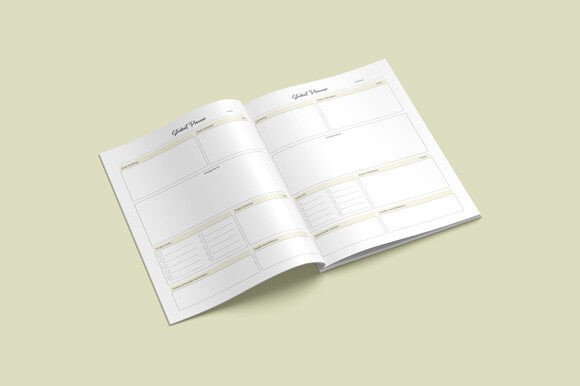
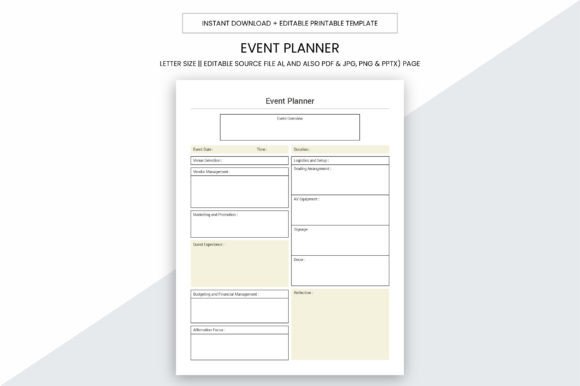
The Event Planner Printable Page is a digital download that delivers immediate utility: 109 pages of ready-to-use, high-resolution interior content optimized for both personal use and commercial distribution. At its core, it’s a functional logbook—8.5 x 11 inches, no bleed, 300 ppi print quality—designed to hold critical information across phases: scoping, scheduling, vendor coordination, budget tracking, attendee management, and post-event review.
It fits where paper-based clarity matters most: when screens distract, when collaboration requires shared physical reference points, or when you need a single source of truth that doesn’t rely on software uptime or login credentials. Unlike cloud-only planners, this printable page works offline, integrates with existing calendars and spreadsheets, and supports tactile engagement—especially helpful during brainstorming, stakeholder alignment, or on-site execution.
How It Supports Real Workflows—Before, During, and After
Before an event: Use the editable AI, PDF, JPG, PNG, and PPTX files to customize templates ahead of time—add your branding, adjust sections for specific client needs, or extract individual pages (e.g., “Budget Tracker” or “Vendor Contact Sheet”) for targeted handouts. The 8.5 x 11 size ensures compatibility with standard binders, laminators, and office printers—no scaling or cropping required.
During an event: Print key pages double-sided and keep them in a clipboard or ring binder. Sections like “Day-of Timeline,” “Emergency Contacts,” and “Check-in Log” are laid out for quick scanning—not buried in menus. Because it’s print-ready at 300 ppi, text remains sharp even when enlarged or photocopied for team members onsite.
After an event: Fill in reflection prompts, ROI notes, and lessons learned directly into printed pages—or scan completed sheets back into digital archives. This creates a closed-loop system: planning decisions → live execution → documented outcomes → reusable insights. Over time, these compiled pages become institutional memory—not just for you, but for clients or teams you support.
Integration With Other Tools and Platforms
This isn’t a siloed solution. The Event Planner Printable Page works alongside tools you already use:
- Project management apps: Export task lists from Asana or ClickUp into the “Action Items” section, then print and annotate during sync meetings.
- Spreadsheets: Pull budget summaries from Excel or Google Sheets and paste them into designated financial pages—then print for finance team reviews.
- KDP publishing: The full 109-page PDF interior is formatted to Amazon’s KDP specifications—no reformatting needed. You can add your cover, set pricing, and publish within hours.
- Design workflows: Editable Adobe Illustrator (.AI) source files let you adjust colors, fonts, or layout structure before exporting new versions for different niches (e.g., wedding planners vs. corporate trainers).
No plug-ins, subscriptions, or API keys required. Just open, adapt, print, use.
Practical Implementation Tips
Start small. Don’t feel pressured to fill all 109 pages at once. Identify one recurring pain point—say, inconsistent vendor follow-ups—and begin using only the “Vendor Communication Log” page for your next three events. Notice what stays useful and what gets skipped. That tells you where to focus customization effort.
For commercial users: batch-print test copies on your preferred paper stock (e.g., 24 lb matte or 32 lb premium) to verify color fidelity and binding durability. Since there’s no bleed, you’ll avoid accidental cutoffs when trimming or spiral-binding—critical for professional resale.
For educators or trainers: extract and reprint specific pages (like “Agenda Builder” or “Participant Feedback Form”) as standalone handouts. The clean, uncluttered layout reduces cognitive load—especially helpful for neurodiverse learners or time-pressed attendees.
For freelancers billing by project phase: use the timeline and milestone tracker pages to visually demonstrate progress to clients—then include scanned copies in final deliverables as proof of process rigor.
Long-Term Usability and Quality Considerations
High-resolution output (300 ppi) means these pages hold up across multiple uses: photocopying for team distribution, scanning into searchable PDFs, or printing on-demand for pop-up events. The lack of bleed also supports consistent margin control—essential if you later convert pages into slide decks (PPTX) or social media carousels (JPG/PNG).
Organization isn’t assumed—it’s built in. Page numbering, clear section headers, and logical progression (from concept to wrap-up) reduce decision fatigue. You’re not choosing *what* to write; you’re focusing on *what matters most right now*.
Consistency builds trust. When your internal planning documents look polished and intentional, clients notice—even if they never see the behind-the-scenes work. And because the files are editable, you can evolve the system over time: adding new checklists, updating contact fields, or localizing language for international clients—without rebuilding from scratch.
Who Benefits—and How They Use It Differently
A small business owner launching a seasonal festival might use the “Permit & Insurance Tracker” and “Volunteer Shift Scheduler” pages to coordinate logistics across departments. A blogger hosting live workshops prints the “Content Prep Checklist” and “Tech Run-Through Sheet” to ensure smooth delivery. An educator designing a school field trip adapts the “Risk Assessment Log” and “Parent Consent Organizer” for compliance and clarity.
Even if your role isn’t “event planner” by title, you’re likely planning something regularly: a product rollout, a course curriculum, a family reunion, or a creative campaign. The Event Planner Printable Page meets those varied needs because it’s rooted in process—not jargon. It assumes you know your goals—you just need structure to execute them without friction.
Preparing for Use—Minimal Setup, Maximum Return
You don’t need design skills or print-shop access to start. Open the PDF in any viewer, select the pages you need, and hit print. Prefer editing? Launch the AI file in Illustrator, tweak spacing or branding elements, then export fresh PDFs. For KDP sellers, upload the included 109-page PDF interior directly—Amazon validates formatting automatically thanks to correct margins and resolution.
Preparation time is measured in minutes, not hours. What takes longer—and delivers more value—is reflection: reviewing past event logs to spot patterns (e.g., “I always underestimate setup time for outdoor venues”), then adjusting future plans accordingly. That kind of iterative improvement is where this tool pays dividends beyond the first print job.
Final Thought: Clarity Through Constraint
The Event Planner Printable Page succeeds because it embraces constraint—not as limitation, but as focus. An 8.5 x 11 format forces prioritization. A fixed page count encourages distillation over accumulation. High-resolution output demands intentionality in layout and content. These aren’t arbitrary choices—they’re features that align with how experienced planners actually work: deliberately, iteratively, and with clear lines between preparation and execution.
Whether you’re documenting your first community event or scaling a KDP planner line, this tool supports growth—not by adding complexity, but by removing ambiguity. It gives you space to think, room to act, and a record to learn from. That’s not just planning. It’s professional continuity, one printed page at a time.