New Version Pet-Sitting Planner Page
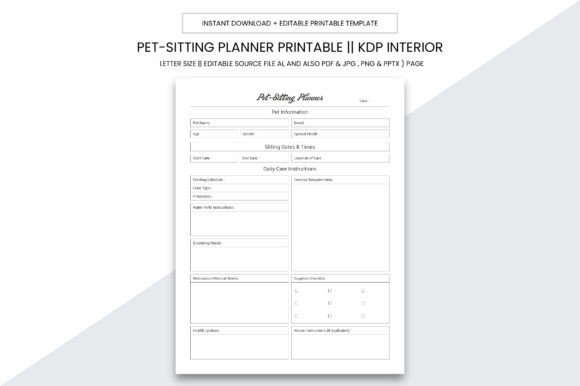
The New Version Pet-Sitting Planner Page isn’t just another printable—it’s a purpose-built operational foundation for anyone managing pet care responsibilities with intention. Whether you’re coordinating drop-in visits for five neighborhood dogs, scaling a licensed pet-sitting business, or designing a premium planner for KDP publication, this 109-page digital resource delivers structural clarity without sacrificing flexibility. Its 8.5 x 11 inch practical size fits standard printers and binders; its no-bleed design ensures clean, professional margins; and its 300 ppi resolution guarantees crisp, high-quality output—whether printed locally or uploaded directly to Amazon KDP.
Why Structure Matters More Than Ever in Pet Care
Pet-sitting is inherently relational—but relationships thrive on reliability, consistency, and traceability. A disorganized logbook creates invisible friction: missed vaccination notes, inconsistent feeding schedules, ambiguous client instructions, or delayed follow-ups. The New Version Pet-Sitting Planner Page eliminates guesswork by embedding proven operational logic into every section—from intake checklists and daily visit summaries to emergency contact trees and behavior observation grids. It doesn’t assume your workflow; it supports iteration. You can use the editable AI source file to adjust column widths for multi-pet households, add custom service tiers (e.g., “Senior Pet Wellness Add-On”), or reorganize the KDP-ready PDF interior to align with your brand voice.
For Independent Pet Sitters Building Trust
When clients hire you, they’re not buying time—they’re buying peace of mind. A handwritten note scribbled on scrap paper won’t reinforce credibility. But presenting a consistent, branded logbook—printed on quality stock, filled with legible entries, and reviewed during handoffs—signals professionalism before the first walk begins. Use the New Version Pet-Sitting Planner Page to document not just *what* happened (“fed at 7 a.m.”), but *how* it mattered (“Baxter ate ¾ of kibble; showed mild reluctance near water bowl—flagged for vet discussion”). That level of observational discipline builds long-term retention and referral-ready testimonials.
For Small Businesses Scaling Operations
If you manage two or more sitters, consistency across teams becomes mission-critical. The editable AI file lets you standardize protocols: embed your SOPs directly into visit templates, lock critical fields (like medication logs) while leaving others open for narrative input, and export weekly summary pages as PDFs for internal review. Because the planner includes 109 KDP-ready interior pages, you can also white-label it—add your logo, adjust color schemes, and publish your own version on Amazon without redesigning from scratch. That’s not just efficiency—it’s strategic IP development.
For Creators and Publishers Targeting Niche Audiences
KDP success hinges on specificity—not volume. Generic planners drown in oversaturated categories. But a well-researched, functionally precise tool like the New Version Pet-Sitting Planner Page answers a narrow, high-intent need: pet professionals who prioritize documentation, compliance, and client communication. Its inclusion of editable source files (AI, PPTX, PDF, JPG, PNG) means you’re not just selling a static product—you’re offering creative leverage. A blogger could bundle it with a “Pet Business Launch Kit”; an educator could adapt pages for student-led animal care practicums; a veterinary clinic could customize intake forms for boarding pre-checks.
What to Consider Before You Print—or Publish
High-resolution files and editable layers are powerful—only if aligned with clear goals. Ask yourself:
- What outcome am I optimizing for? Is it faster client onboarding? Fewer miscommunication disputes? Stronger KDP conversion rates? Each goal shifts how you’ll use the planner’s structure.
- Where does my current process break down? If scheduling conflicts arise most often on weekends, prioritize the weekly overview layout—not the daily journal. If liability concerns keep you up at night, emphasize the signed consent and medical authorization sections.
- Who owns the data—and how will it flow? Printed logs stay local. Digital edits in AI or PPTX should be backed up and version-controlled. If integrating with apps (e.g., Trello or HoneyBook), treat the planner as your single source of truth—not a redundant duplicate.
Without that intentionality, even the best-designed planner becomes clutter. A beautifully printed 109-page PDF means little if it sits unopened beside your laptop while you scramble to reconstruct yesterday’s walk times from Slack messages.
Design Decisions That Support Real Work
This isn’t aesthetic-first design. Every dimension and format choice serves functional durability:
- 8.5 x 11 inch size: Fits standard binders, desktop scanners, and most thermal receipt printers—critical when logging on-site after a rainy walk.
- No bleed: Eliminates risk of clipped text or logos when trimming post-print—especially important for KDP interiors where margin errors trigger rejection.
- 300 ppi resolution: Ensures barcodes, QR codes (e.g., linking to client video instructions), and fine-print legal disclaimers remain legible—even when photocopied or faxed.
- Multi-format delivery: AI for deep customization, PPTX for quick slide-based training decks, JPG/PNG for social proof graphics, PDF for immediate print-and-go use.
That versatility matters because real-world use isn’t linear. One day you’re editing vaccine tracking headers in Illustrator. The next, you’re projecting the “Daily Behavior Snapshot” page onto a screen during a team huddle. The day after, you’re emailing a JPG of yesterday’s completed log to a client whose senior cat had an off-day—and that visual confirmation carries more weight than a bullet-point email.
Risks of Using Without Context—and How to Mitigate Them
A planner can’t compensate for unclear boundaries, outdated knowledge, or poor communication habits. Relying solely on the New Version Pet-Sitting Planner Page without pairing it with active client dialogue may lead to assumptions—e.g., assuming “standard walk” means the same thing to every owner. Similarly, using editable files without naming conventions or backup protocols risks version sprawl: “Planner_FINAL_v3_edit_July2024.ai” vs. “Planner_CLIENT_READY_KDP_2024.ai”. To avoid this:
- Define one “source of truth” file per project and archive variants with clear dates and purposes.
- Use the planner’s built-in prompts—not as checkboxes, but as conversation starters (“How did Luna respond to the new calming spray?”).
- Review at least two pages monthly—not for completion, but for insight: Where do entries trend vague? Where do clients consistently add handwritten notes? That’s where your process needs refinement—not just more pages.
Long-Term Value Lies in Iteration, Not Installation
The highest-performing users treat the New Version Pet-Sitting Planner Page as a living system—not a one-time download. They audit their logs quarterly: Which pages go unused? Which get annotated heavily? What questions do clients ask repeatedly that aren’t captured anywhere? Then they revise—using the AI file to delete redundancy, add nuance, or shift emphasis. One pet-sitting agency reduced no-shows by 22% after adding a “Pre-Visit Confirmation Checklist” to their customized version—based entirely on patterns observed in their own completed logs.
That kind of insight doesn’t come from the planner alone. It comes from using it deliberately, reviewing it critically, and adapting it honestly. The 109-page KDP interior isn’t meant to be static canon—it’s scaffolding. Your expertise, your clients’ needs, and your evolving standards shape what goes inside it.
So whether you’re printing your first copy for tomorrow’s client meeting, uploading your branded version to KDP, or opening the AI file to redesign a section for your team’s next training cycle—the New Version Pet-Sitting Planner Page works only as well as the thinking behind it. Choose focus over volume. Prioritize clarity over decoration. And let every page serve a decision—not just fill space.