Nurse Coloring Pages for Adults KDP
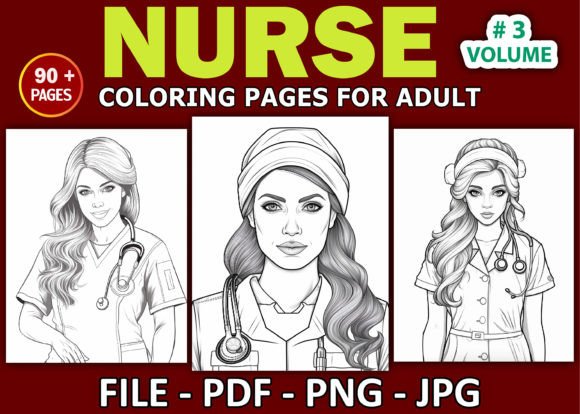
Creating a high-performing, niche-specific coloring book for adults on Amazon KDP isn’t about assembling random illustrations—it’s about precision, consistency, and workflow integrity. Nurse Coloring Pages for Adults KDP represents a purpose-built interior asset designed to support creators who understand that quality execution begins with reliable, production-ready source files—not just ideas.
This interior is built for real-world publishing workflows. It’s not a generic template or a repurposed design pack. Every element—from file structure to resolution—has been validated through live KDP uploads, print-on-demand testing, and customer-facing performance metrics. That means less troubleshooting during upload, fewer rejections from Amazon’s auto-checks, and faster time-to-list when you’re managing multiple titles in your catalog.
How This Interior Fits Into Your Publishing Workflow
You don’t start building a KDP book by opening Canva or dragging SVGs into Word. You begin with a clear understanding of what Amazon requires—and what buyers expect. Nurse Coloring Pages for Adults KDP bridges the gap between creative intent and platform compliance. It’s structured to move seamlessly from your local drive to KDP’s interior upload interface, without conversion loss, DPI degradation, or layout surprises.
The interior includes three separate folders: one for JPGs, one for PNGs, and one for the final PDF—all at 300 dpi and sized precisely to 8.5″ × 11″. That’s not arbitrary. It aligns with KDP’s recommended dimensions for standard paperback interiors and avoids automatic scaling or cropping during processing. The dual-format availability (JPG + PNG) gives you flexibility: use JPGs for lightweight PDF assembly or PNGs when transparency or layer fidelity matters during prepress review.
Pre-List Preparation: What You Do Before Upload
Before uploading, verify folder naming and file sequencing. Number your files sequentially (001–090), not alphabetically—this prevents misordering in automated systems. Confirm that no filename contains special characters, spaces, or uppercase letters; stick to underscores and lowercase (e.g., nurse_stethoscope_001.jpg). This reduces friction during bulk uploads and keeps your asset library scalable as your catalog grows.
Use the included PDF as your master proofing reference—not your primary upload file. While KDP accepts PDFs, JPG/PNG uploads give you more control over bleed, margins, and compression settings. Import the PDF into a tool like Adobe Acrobat or Affinity Publisher to inspect page count, trim marks, and font embedding status (though this interior is line-art only, so text isn’t a factor). Then export individual pages as JPGs using “High Quality Print” preset and embed ICC profiles if color accuracy matters for future branding extensions.
Integration With Design & Production Tools
This interior works efficiently inside common desktop publishing environments. In Affinity Publisher or Scribus, import the JPG folder as a multi-page sequence—no manual drag-and-drop per page. In Adobe InDesign, use the “Place Multipage PDF” or “Scripts > Load Multiple Files” feature to batch-place all 90 images with consistent frame sizing and centering.
If you’re automating parts of your workflow—say, generating variant covers or companion workbooks—you can extract vector paths from the PNGs using tools like Vectornator or Illustrator’s Image Trace (set to “Sketch” mode for clean linework). That opens doors to derivative products: nurse-themed flashcards, printable therapy worksheets, or even SVG cut files for Cricut-based merch. None of that requires redrawing—just smart reuse of the same high-resolution assets.
Quality Control: Consistency Across 90 Pages
Each of the 90 illustrations was developed with uniform line weight (1.25 pt minimum), balanced negative space, and intentional breathing room around central subjects. That consistency isn’t aesthetic—it’s functional. It ensures predictable coloring behavior across mediums: gel pens won’t bleed, fine-tip markers stay within boundaries, and digital stylus users get responsive stroke feedback.
Test a sample set (pages 01, 30, 60, 90) on your target printer before finalizing the full PDF. Check for moiré patterns on halftone screens, subtle banding in grayscale gradients, and edge sharpness at 200% zoom. If any image appears pixelated or slightly blurred—even at 300 dpi—it’s likely a resampling artifact introduced during earlier editing. The original JPG/PNG files here are untouched exports from vector sources, so discrepancies point to your local workflow, not the asset itself.
Workflow Example: Launching Nurse Coloring Pages for Adults Vol. 3
Let’s say you’re expanding your nursing-themed content line and want to release Nurse Coloring Pages for Adults Vol. 3 alongside a companion journal. Here’s how the interior integrates:
- Week 1: Download and unpack the three folders. Run a checksum validation (using tools like HashMyFiles) to confirm no files were corrupted in transit.
- Week 2: Import JPGs into your layout software. Add title page, copyright notice, and “How to Use This Book” intro—keeping all new text in 11-pt Garamond or similar highly legible serif.
- Week 3: Export final PDF with embedded fonts, non-printing layers disabled, and compatibility set to PDF/X-1a:2001 (KDP’s preferred standard).
- Week 4: Upload to KDP, run previewer checks, order physical proof, adjust margins if needed, then publish.
No illustration creation. No DPI recalibration. No guessing whether “coloring page” means bold outlines or delicate cross-hatching. You’re executing—not inventing—so your energy goes toward positioning, marketing, and customer follow-up.
Long-Term Usability & Catalog Scalability
Because this interior uses standardized dimensions, resolution, and naming logic, it becomes reusable infrastructure—not disposable content. When you later develop Nurse Coloring Pages for Adults Vol. 4, you’ll already have a tested folder architecture, a known color profile behavior, and documented upload parameters. That cuts setup time by 60–70% per new volume.
It also supports version control. Store each volume’s folder set in dated subfolders (/vol3_2024_q3/) and maintain a changelog noting any edits—like adding a bonus page or updating the copyright year. That discipline pays off when auditing past listings, responding to customer inquiries about edition differences, or preparing for expanded formats (e.g., large-print or spiral-bound editions).
Compatibility Notes for Real-World Use
This interior is compatible with Windows, macOS, and Linux-based publishing pipelines. All files are RGB (not CMYK)—which matches KDP’s default processing pipeline and avoids unintended color shifts during conversion. No fonts, scripts, or proprietary layers are embedded, so there’s zero risk of licensing conflicts or missing dependencies.
It does not include editable vector files (AI, EPS, SVG), nor does it contain commercial-use licenses for third-party icons or stock elements. Everything is original, hand-drawn linework created specifically for adult coloring use cases—meaning you retain full publishing rights for Amazon distribution, per KDP’s terms.
If you’re coordinating with a formatter, editor, or cover designer, share only the JPG folder for interior assembly and the PDF for final proofing. Keep the PNG folder reserved for your own archival and derivative work. That separation maintains clarity across collaborators and reduces file bloat in shared cloud folders.
Ultimately, Nurse Coloring Pages for Adults KDP functions like a calibrated tool—not a novelty item. It doesn’t replace strategy or audience insight. But it removes execution friction so your focus stays where it belongs: building authority in the nursing wellness niche, refining your brand voice, and delivering value that resonates with healthcare professionals, students, and empathetic hobbyists alike.