Composition Notebook DIY Kit 5 for Canva
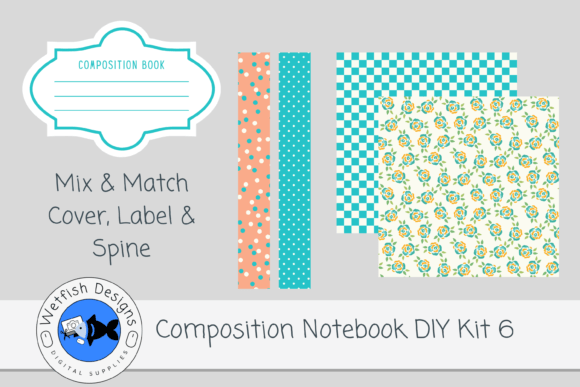
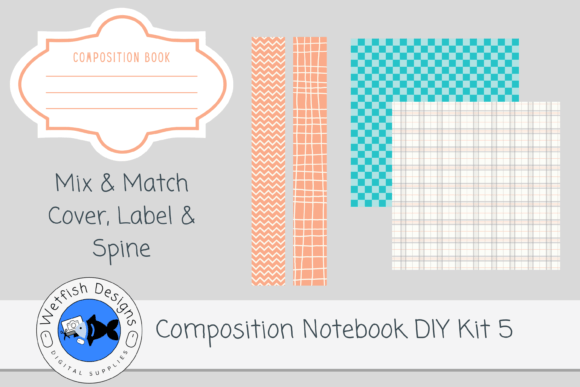
Composition Notebook DIY Kit 5 for Canva is a digital design resource intended for creators preparing paperback composition notebook covers for Kindle Direct Publishing (KDP). It includes pre-sized, print-ready assets: two spine designs in PNG format (300 DPI), two 12×12 inch cover paper backgrounds in JPG (also 300 DPI), and a fully editable Canva template. A supplementary PDF contains the source files and instructions for customization. Notably, interior pages are not included—this kit serves exclusively as a cover design toolkit.
This kit appeals primarily to self-publishing authors, stationery designers, and small-business owners who produce themed notebooks on KDP. Its value lies in offering coordinated, high-resolution visual elements that simplify cover assembly without requiring advanced graphic design skills. The inclusion of a Canva template lowers the technical barrier: users can adjust text placement, add titles or subtitles, and preview layout proportions before exporting final files compliant with KDP’s specifications.
One practical benefit is consistency across multiple notebook listings. Because the spines and cover papers share a unified color palette and stylistic direction, creators can maintain brand cohesion when launching several notebooks in a series—such as seasonal themes, subject-based study journals, or motivational quote collections. The 300 DPI resolution ensures sharp output for print, reducing the risk of pixelation or blurriness that sometimes occurs with low-resolution downloads.
However, certain tradeoffs accompany this convenience. First, customization is limited to the provided assets. While the Canva template allows for text edits and basic layering, users cannot alter core design motifs—like patterns, illustrations, or typography treatments—unless they possess image-editing software and licensing rights to modify raster files. Second, the fixed 12×12 inch paper size assumes standard composition notebook dimensions (typically 7.5″ × 9.25″), but actual trim size depends on spine width, bleed settings, and KDP’s current guidelines. Users must verify measurements against KDP’s latest cover calculator to avoid cropping errors during printing.
Another consideration is workflow integration. Designers already using Adobe Photoshop or Affinity Publisher may find the PNG/JPG format less flexible than layered PSD or PDF sources—especially when adjusting shadows, gradients, or masking elements. Similarly, those needing CMYK color profiles for professional offset printing will need to convert files manually, as the kit delivers RGB assets optimized for screen use and KDP’s digital print process.
The kit is a strong fit for creators who prioritize speed and visual harmony over deep customization. For example, an educator launching a set of math practice notebooks might use Composition Notebook DIY Kit 5 for Canva to quickly generate five distinct but thematically linked covers—each with matching spines and complementary background papers—while focusing energy on interior content development rather than cover design from scratch.
It also suits newcomers testing KDP’s notebook market. Since KDP does not require ISBNs for paperback notebooks and has relatively low upfront costs, beginners often start with small batches. This kit reduces initial design overhead, allowing them to iterate based on sales data before investing in custom illustrations or hiring a designer.
Conversely, alternatives may be preferable in several situations. If a creator requires full creative control—including editable vectors, customizable fonts, or scalable patterns—a vector-based design kit (e.g., SVG or EPS bundles) would offer greater flexibility. Similarly, if branding demands unique iconography, proprietary illustrations, or strict adherence to a specific style guide, commissioning original artwork or using subscription-based design tools with broader asset libraries (like Creative Market or Envato Elements) could better serve long-term needs.
Designers working across multiple product types—such as planners, workbooks, or hardcover journals—may also find value in modular kits with interchangeable components. Some creators prefer purchasing spine-only or paper-only packs to mix assets across different kits, enabling more variation without redundancy. In such cases, evaluating whether Composition Notebook DIY Kit 5 for Canva overlaps significantly with existing resources helps prevent unnecessary duplication.
Practical decision-making starts with clarifying intent. Ask: Is the goal to launch a single notebook or a cohesive series? Does the project timeline allow time for learning Canva’s interface—or is familiarity with the platform already established? Are color accuracy, texture detail, or typographic nuance critical to the brand voice? Answering these questions reveals whether the kit’s balance of structure and simplicity aligns with current priorities.
Also consider scalability. While this kit supports efficient production for up to two distinct covers (given the two spines and two papers), expanding beyond that typically requires purchasing additional kits or adapting files externally. Users planning more than four variations should assess whether the cumulative cost of multiple kits compares favorably to one-time investment in custom design services or broader asset subscriptions.
Finally, review KDP’s current cover requirements before purchase. Though the kit follows common composition notebook dimensions, Amazon occasionally updates file specifications—such as bleed allowances, safe zones, or font embedding rules. Confirming compatibility avoids delays during upload and ensures the final printed product matches on-screen previews.
In summary, Composition Notebook DIY Kit 5 for Canva functions best as a tactical tool—not a comprehensive solution. It streamlines cover creation for users who value coordination, print readiness, and ease of use over granular control. When evaluated against specific goals—launch timing, design skill level, brand consistency needs, and budget constraints—it becomes clearer whether this kit fills a genuine gap or simply adds to an already sufficient toolkit.