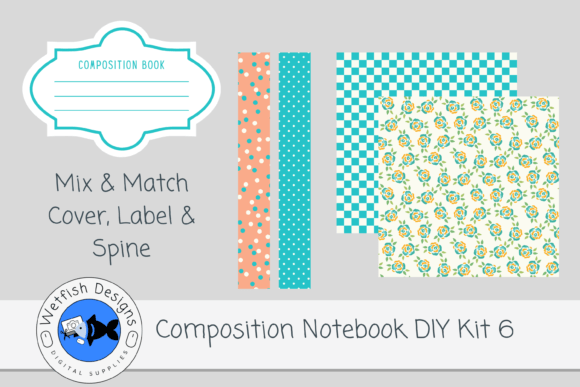
Composition Notebook DIY Kit 6 for Canva
If you’re designing composition notebooks for Kindle Direct Publishing (KDP), consistency, quality, and speed matter—especially when launching multiple titles. Composition Notebook DIY Kit 6 for Canva delivers exactly that: a streamlined, professional-grade toolkit built for real-world KDP cover production. It’s not just another set of graphics—it’s a thoughtfully curated collection of high-resolution, print-ready assets designed to eliminate guesswork while preserving creative control.
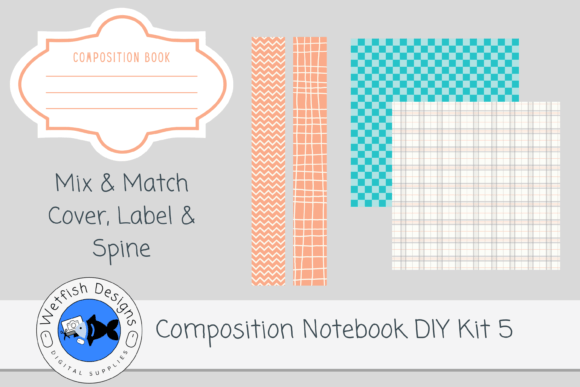
The kit includes two 300dpi PNG spines—crisp, transparent, and sized to match standard composition notebook dimensions—and two 12×12 inch JPG cover papers, also at 300dpi. These aren’t generic textures or overused stock patterns. They’re coordinated by color family and visual rhythm, so mixing a spine from this kit with a paper from Kit 3 or Kit 5 still feels intentional—not accidental. That coordination saves time during layout and strengthens brand cohesion across your KDP catalog.
Why This Kit Fits Real Creative Workflows
Most designers don’t start from scratch—they iterate. And iteration needs flexibility. That’s where the included Canva template shines. Unlike static mockups, this editable Canva file lets you adjust bleed, safe zones, spine width, and front/back proportions in real time—no design software required. You can preview how text wraps around the spine, test font sizing against background contrast, or shift elements to avoid gutter distortion—all before exporting.
The downloadable PDF contains the original source file, fully editable in Canva. No locked layers. No hidden watermarks. Just clean vectors, organized layers, and clear naming conventions—so if you’re managing multiple notebooks for clients or building a series (like “Mindful Journaling,” “STEM Lab Notes,” or “Creative Writing Prompts”), you can duplicate the template, swap colors, update copy, and export in under five minutes.
Creative Possibilities—Without Overcomplicating
You don’t need advanced illustration skills to make something distinctive. With Composition Notebook DIY Kit 6 for Canva, originality comes from smart combination—not solo creation. Try these grounded approaches:
- Theme layering: Pair a geometric spine with a soft watercolor paper for contrast—ideal for educators launching classroom journals. The sharp lines signal structure; the texture invites reflection.
- Audience signaling: Use warm-toned papers and rounded spines for wellness or self-care notebooks; cooler tones and clean sans-serif spines for technical or academic audiences.
- Series consistency: Keep spine style identical across 3–5 notebooks but rotate paper textures. Readers recognize your brand at a glance—even on a crowded Amazon thumbnail.
- Localized adaptation: Swap English title placement for right-to-left layouts (e.g., Arabic or Hebrew) using Canva’s alignment tools—no redesign needed.
None of these require new assets—just intentionality. That’s the quiet power of this kit: it gives you room to think about *who* the notebook is for, not just *how* to get it printed.
Who Benefits—and How
Freelance designers use kits like this to deliver polished KDP covers faster—without sacrificing customization. You can apply your client’s brand palette directly in Canva, adjust typography to match their voice, and hand off print-ready files in one round of revisions instead of three.
Educators and course creators often bundle printable workbooks or guided journals. With Composition Notebook DIY Kit 6 for Canva, they build cohesive companion notebooks—say, a “Math Practice Log” with a bold, grid-based spine and a subtle graph-paper-inspired cover—to reinforce learning themes visually.
Small publishers and indie authors scale more efficiently. Instead of commissioning custom covers for every new journal title, they maintain a consistent aesthetic across niches (planners, gratitude logs, habit trackers) using interchangeable spines and papers. It builds trust—and repeat buyers.
Even hobbyists turning passion into product find value here. Maybe you sketch botanicals and want to sell field notebooks. Use the textured paper as a base, overlay your own line art in Canva, and let the kit handle the structural precision—spine width, bleed margins, CMYK-safe color zones.
Practical Tips for Stronger Results
Clarity starts with constraints—and this kit provides helpful ones. Here’s how to use them well:
- Test readability early: Paste your title and subtitle into the Canva template at actual size. If letters blur or blend into the background at 75% zoom, simplify the paper texture or add a subtle drop shadow.
- Respect KDP’s spine math: Standard composition notebooks are usually 7.5" × 9.25". Spine width depends on page count—but the included PNG spines assume common ranges (100–200 pages). Double-check your final trim size in KDP’s calculator before finalizing.
- Keep color accessible: Avoid placing light gray text on light paper—or dark navy on deep indigo. Use Canva’s contrast checker (or free tools like WebAIM) to verify legibility for readers with low vision.
- Export with intent: Save final covers as PDF/X-1a for KDP upload—not JPEG. It preserves fonts, transparency, and color profiles correctly. The kit assets are already 300dpi; just ensure your Canva export settings match.
Remember: A great cover doesn’t shout. It signals relevance, quality, and care—in under two seconds. Composition Notebook DIY Kit 6 for Canva helps you communicate all three, without reinventing the wheel each time.
What’s Not Included—And Why That Matters
Interior pages aren’t part of this kit—and that’s deliberate. It keeps the focus tight: cover design, branding, and KDP readiness. You choose your interior format (lined, dotted, blank, custom grids) based on audience need—not bundled assumptions. That separation gives you freedom: pair this cover kit with a minimalist dot-grid interior for creatives, or a bold college-ruled layout for students. Your audience’s workflow—not the kit’s limitations—drives the decision.
If you’ve ever spent hours tweaking a spine in Photoshop only to discover a 0.02" margin error after KDP review, you’ll appreciate how this kit removes those friction points. It’s not about doing less creative work—it’s about doing the *right* creative work, with fewer setbacks and more confidence in the result.