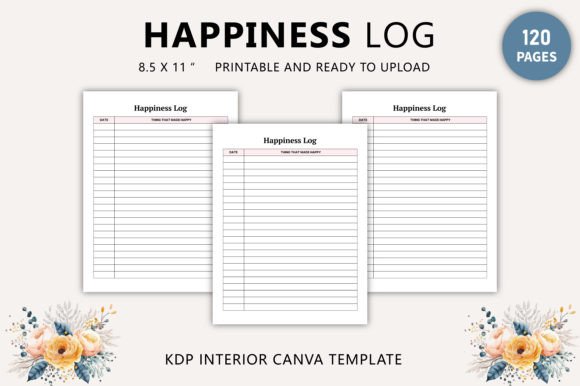
Happiness Logbook Canva Template
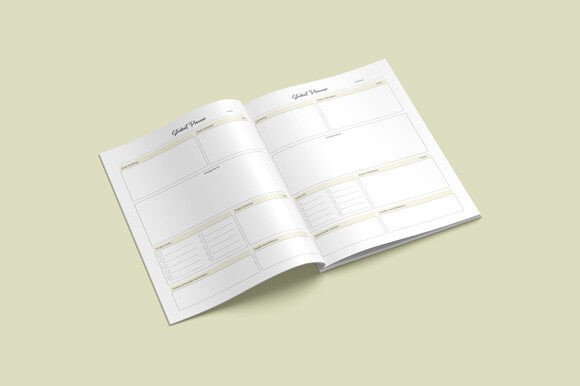
Tracking joy isn’t about perfection—it’s about presence. The Happiness Logbook Canva Template gives you a grounded, beautifully structured way to notice, record, and reflect on moments that uplift you—without the friction of starting from scratch. Designed for real life—not just aesthetics—it’s a 120-page, print-ready tool that balances intentionality with ease.
This isn’t a generic journal prompt pack or a static PDF you can’t change. It’s a living resource: an editable Canva link you control, paired with high-resolution JPG, PNG, and CMYK-optimized PDF files—all sized at 8.5 × 11 inches, 300 DPI, no bleed. Every page is original, thoughtfully spaced, and built for clarity—not clutter.
Why This Design Works—Beyond Aesthetics
Most happiness trackers fail because they’re either too rigid (forcing daily entries) or too vague (leaving users unsure what to write). This template bridges that gap. Each spread includes subtle visual cues—soft margins, intentional white space, gentle typography—that invite reflection without pressure. There are prompts, but not prescriptions. Space for lists, sketches, quotes, or silence—whatever your mood or energy allows.
The CMYK color profile and 300 DPI resolution mean it’s KDP-ready straight out of the box. If you're publishing on Amazon, you won’t need to reformat, rescale, or second-guess color accuracy. And because it’s delivered as both a printable PDF *and* an editable Canva file, you retain full creative agency—you decide whether to keep the minimalist layout, add brand colors, insert custom headers, or adapt pages for specific audiences.
Creative Applications—Far Beyond Personal Use
Creators and educators use this template as a foundation—not an endpoint. A mindfulness coach might duplicate 10 pages, add guided reflection questions (“What small choice today supported my calm?”), and bundle them into a client onboarding kit. A school counselor could extract 20 themed spreads—gratitude, resilience, connection—and integrate them into SEL lesson plans.
Bloggers and newsletter writers repurpose individual pages as downloadable lead magnets: “Your 7-Day Happiness Snapshot” (a curated 7-page version) builds trust while showcasing their voice. Freelance designers use the editable Canva link to rapidly prototype custom logbooks for clients—swapping fonts, adjusting spacing, inserting logo watermarks—then deliver both branded PDFs and editable links as part of a service package.
Small business owners embed it into wellness programs: HR teams customize cover pages with company values, add internal reflection prompts (“When did I feel most supported this week?”), and distribute printed copies during mental health awareness month—paired with optional digital access for remote staff.
How Different Users Adapt It—Practically
- Entrepreneurs: Use the first 10 pages as a “clarity dashboard”—tracking energy levels alongside meetings, launches, or outreach. Spot patterns: Do creative bursts happen mid-morning? Does collaboration drain focus on Fridays? The structure reveals insights you’d miss in a notes app.
- Educators: Print single spreads for classroom reflection—no login required. Students fill them out post-activity, building emotional vocabulary and self-awareness. The clean design avoids infantilizing older learners.
- Content creators: Turn blank journal pages into storyboard frames. Sketch quick visuals next to gratitude notes. Paste screenshots of positive comments beside reflections on what made that content resonate.
- Therapists & Coaches: Customize prompts to align with therapeutic goals—e.g., “What sensation accompanied that moment of ease?” or “Which boundary held space for joy today?” Then export as client handouts.
- Hobbyists & Journalers: Treat it like modular stationery. Print only the pages you’ll use this month—skip the rest. Add washi tape, ink washes, or collage elements directly onto printed sheets. The high-res PDF ensures crisp detail even with mixed media.
Keeping It Useful—Not Just Pretty
Originality matters—but so does function. That’s why every page in the Happiness Logbook Canva Template serves a clear purpose. No decorative flourishes that distract from writing. No tiny fonts that strain eyes during evening reflection. No forced positivity—space is included for “today was hard, and that’s okay” alongside joyful notes.
To maintain consistency across uses: start by defining your goal before editing. Are you building a product for sale? Focus on branding cohesion—consistent headers, aligned margins, readable body text. Creating a personal tool? Prioritize flexibility—duplicate pages, hide sections you don’t need, adjust line spacing for handwriting comfort.
For audience-friendly results: test readability at actual print size. Zoom in on your Canva screen to 100%—if text feels cramped or alignment wobbles, simplify. Use Canva’s grid and alignment tools religiously. And remember—white space isn’t empty; it’s breathing room for thought.
Getting Started—No Overwhelm Required
You don’t need to edit all 120 pages at once. Open the Canva link, scroll to page 15 (a simple two-line daily entry), duplicate it five times, and rename the tab “My First Week.” That’s your launchpad. Or go straight to the PDF—print pages 1–12, bind them with a clip, and begin.
If you’re publishing via KDP: upload the provided PDF as-is for fastest turnaround. Want differentiation? Swap the cover in Canva, export as PDF, and replace only that file—keeping interior formatting intact and compliant.
This template doesn’t ask you to become more joyful. It asks you to become more observant—to collect evidence of light, however small, and hold it where it can be seen, revisited, and understood. That kind of attention changes how you move through the world. Not dramatically. But steadily.
The Happiness Logbook Canva Template is ready when you are—designed for doing, not just dreaming. Your version starts with one page. One entry. One honest sentence. Everything else unfolds from there.